
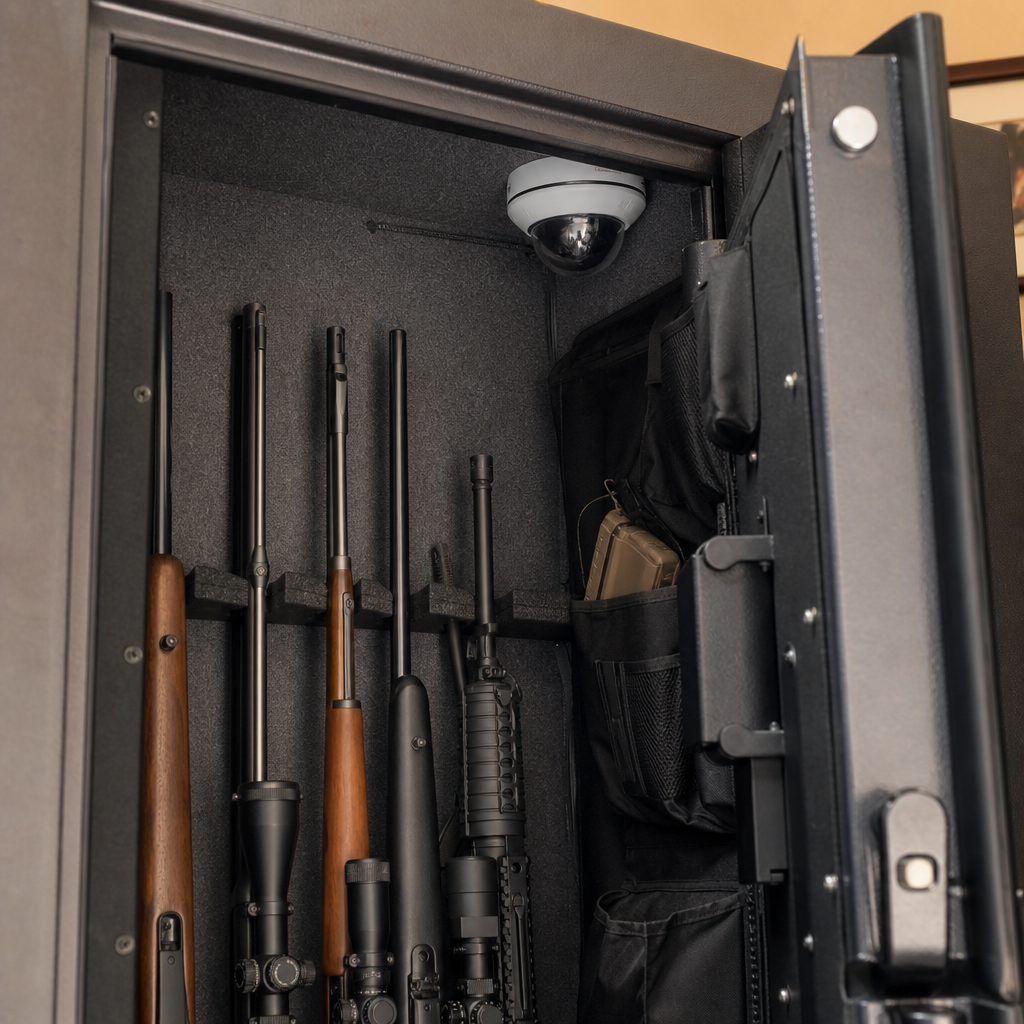
Installing a surveillance camera inside your gun safe is one of the most practical custom gun safe modifications you can make if you want proof of access, better inventory control, and faster response after a theft attempt. In plain terms, an inside-safe camera is a compact security device mounted within the safe body that records video, stores clips locally or in the cloud, and often sends alerts when the door opens or motion is detected. I have set these up in residential safes, commercial document safes, and retrofit cabinet builds, and the same lesson always holds: the camera itself is only half the job. Power delivery, signal reliability, mounting method, and safe-door movement determine whether the installation works every day or fails when you need evidence most.
This topic matters because a gun safe protects firearms from unauthorized access, but it does not automatically tell you who opened it, when it was opened, or what was removed. A surveillance camera adds accountability. It can help parents monitor access, help collectors document high-value inventory, and help owners verify whether tampering occurred during a move, service call, or burglary attempt. For many owners, this article is also the starting point for broader custom and DIY gun safe modifications, including lighting, humidity control, smart sensors, door organizers, internal power systems, and reinforced anchoring. As a hub for custom and DIY gun safe modifications, this guide explains the camera installation itself while showing how it connects to the rest of a well-planned safe upgrade strategy.
What a gun safe camera can and cannot do
A surveillance camera inside a gun safe can record who accessed the contents, capture close-range images of hands, documents, or firearms, and trigger timestamps that support your access log. The best setups use a camera with motion detection, night vision or low-light capability, local recording on microSD, and optional app alerts. In a typical home installation, the camera is positioned high on a side wall or under the top shelf aimed toward the door opening so it records both the person accessing the safe and the shelves or racks being touched. If the safe has a door organizer, a wide-angle lens helps cover both the body and the door panel.
What it cannot do is replace exterior home security, fire protection, or physical access control. A camera inside the safe will not stop prying, drilling, or lock manipulation. It also may not transmit reliably through thick steel, especially in a sealed environment that blocks Wi-Fi or cellular signal. Fire-rated safes present another limitation because drilling, routing cables through the body, or compromising intumescent seals can reduce performance. That is why installation planning matters. Before buying hardware, decide whether your priority is real-time alerting, local evidence retention, or a simple visual record. Each goal points to a different camera, power method, and mounting approach.
Choosing the right camera, power source, and connection method
The most reliable camera for a gun safe is usually a small indoor Wi-Fi camera with local storage, USB power, adjustable motion zones, and infrared illumination that can be disabled if it causes glare on polished finishes. Brands such as Reolink, Eufy, Wyze, and Ring offer compact models, but not every feature translates well to a steel enclosure. In my experience, local recording is essential because wireless notification may fail once the door closes. A camera that records to microSD keeps evidence even if the signal drops. Battery-powered cameras seem convenient, but inside a safe they often become a maintenance burden, especially if low temperatures or long standby periods affect battery life.
Power is the first major design decision. If your safe already has a factory pass-through outlet kit, use it. Liberty, Browning, and other manufacturers offer electrical access ports or dehumidifier holes that can sometimes accommodate a low-voltage cable without new drilling. If there is no pass-through, many owners route a flat USB cable near the door gap, but that should be tested carefully because gasket compression and door movement can eventually damage the cable. Drilling a new hole is possible on some non-fire-rated cabinets, but on many true safes it risks warranty issues, insulation damage, and weakened fire sealing. When drilling is unavoidable, confirm the wall construction with the manufacturer first.
| Installation choice | Best use case | Main advantage | Main limitation |
|---|---|---|---|
| Wi-Fi camera with microSD | Home owners wanting alerts and local backup | Flexible setup and easy app access | Signal may weaken once the safe closes |
| Wired USB camera to local recorder | Owners prioritizing dependable recording | Stable power and predictable storage | More complex cable routing |
| Battery camera | Temporary or no-drill installations | No continuous power cable needed | Frequent charging and weaker always-on performance |
| Borescope or hidden mini camera | Discrete evidence capture in tight interiors | Fits small safes and cabinet corners | Often lower image quality and weaker apps |
Connection method is the second decision. Wi-Fi inside a safe is inconsistent because steel behaves like a partial Faraday enclosure. In practice, signal strength depends on wall thickness, door seal design, and the safe’s location relative to your router or mesh node. A simple fix is placing a mesh satellite or access point in the same room, ideally within line of sight of the safe door. If real-time alerts are not critical, use local storage and synchronize clips when the door opens. Some advanced owners use a contact sensor on the safe door linked to a smart home hub, which triggers the camera to wake, record, or send a notification through a nearby relay device. That hybrid approach is often more dependable than trusting motion detection alone.
Planning the installation without damaging the safe
Before mounting anything, empty the safe and inspect the interior layout. Note shelf positions, hinge side, door swing path, power access points, carpeting, and any factory-installed lighting or dehumidifier systems. The objective is to mount the camera where it sees the opening action and the storage area while avoiding interference with rifles, optics, shelving, or door organizers. In most safes, the top rear corner or upper side wall works best. That angle captures hands reaching in and also reduces obstruction from long guns. If the safe stores handguns, documents, and jewelry on multiple levels, mount higher and use a camera with a 110 to 130 degree field of view rather than an ultra-wide lens that distorts details.
Use non-destructive mounting whenever possible. Industrial hook-and-loop fastener, 3M VHB tape, magnetic mounts attached to interior steel, and accessory rails fixed to shelving are all safer than drilling into the safe body. VHB works well on smooth powder-coated steel if the surface is cleaned with isopropyl alcohol and allowed to cure properly. Magnetic mounts are ideal for testing camera placement because you can reposition them repeatedly before committing. If the safe interior is carpet-lined, a small aluminum plate can be adhered first to create a stable mounting surface. Avoid putting the camera on a shelf edge where recoil pads, soft cases, or cleaning rods may bump it out of alignment.
Cable management is where many DIY gun safe modifications start to look amateur. Route USB or low-voltage cable along interior corners and secure it with adhesive-backed clips rated for the safe’s temperature range. Leave slack at hinge-side transition points and confirm the door closes without pinching. If you are also adding LED lighting, a dehumidifier rod, or a smart hygrometer, plan all wiring together so the camera installation supports future upgrades instead of creating clutter. This is one reason this article serves as a hub under custom and DIY gun safe modifications: camera work, lighting, power distribution, moisture control, and interior organization should be designed as a system, not as isolated add-ons.
Step-by-step installation and setup
Start by bench-configuring the camera before it goes inside the safe. Update firmware, create the account, format the microSD card, set the time zone, and test recording quality in low light. Turn off unnecessary status LEDs so they do not advertise the camera or create glare. If the camera offers HDR, test it with a flashlight because bright reflections from stainless barrels or glass optics can wash out the image. Then move the camera into the open safe and check the live view while you simulate normal access. Reach for the most commonly used firearm, open drawers, and verify that your hands and item labels are visible.
Once placement is confirmed, mount the camera and connect power. If using adhesive, apply firm pressure and allow the manufacturer’s recommended curing time before loading the safe. Set motion sensitivity lower than you would in a room because the enclosed space amplifies small changes in light and movement. Create motion zones if available so the camera focuses on the shelf faces and door opening area rather than the entire frame. Record several test clips with the door fully open, partly open, and closed. On more than one installation I have seen infrared bounce back from light-colored interiors, so if night footage appears hazy, reduce infrared intensity or add a low-output LED light strip triggered by the door opening.
Complete the setup by validating your evidence chain. Confirm where clips are stored, how long they are retained, and whether timestamps remain accurate after a power loss. If the camera supports continuous recording, use that mode when feasible because brief motion-triggered clips can miss the start of an access event. Pair the camera with a door contact sensor for cleaner event timing. If your safe uses a keypad lock, test whether app notifications arrive quickly enough to matter in real life. The installation is not finished until you have opened the safe repeatedly over several days and confirmed that power, alignment, storage, and notifications all remain stable.
Integrating the camera with other DIY gun safe modifications
An inside-safe camera works best when paired with related upgrades. LED lighting is the most common companion modification because cameras inside dark safes need consistent illumination to capture identifying detail. A warm white strip mounted behind a door frame lip reduces harsh reflection better than a single bright puck light. Humidity control is another priority. If you store firearms long term, add a GoldenRod or silica-based system and a digital hygrometer; condensation, rust, and lens fog can all compromise footage and firearm condition. Door organizers, pistol racks, and labeled bins also make the camera more useful because the video shows exactly which slot or pouch was accessed.
For advanced setups, integrate the camera with a smart home platform such as Home Assistant, SmartThings, or an alarm panel that accepts dry-contact inputs. A door sensor can trigger recording, activate interior lights, and log the event in one timeline. Some owners also install an external camera facing the safe so they capture both the person approaching and the actions inside. If you maintain a firearms inventory for insurance, photograph serial numbers separately and store copies offsite; the interior camera helps verify access, but it should not be your only documentation method. The best custom and DIY gun safe modifications combine physical protection, environmental control, visibility, and records management into one coherent system.
Common mistakes, legal considerations, and maintenance
The most common mistake is choosing convenience over reliability. Owners buy a battery camera, stick it to carpet, and assume the job is done. A month later the battery is dead, the adhesive has shifted, or the app never saved clips after the safe door closed. Another mistake is drilling without understanding the safe wall construction. Fireboard, insulation layers, relockers, and door mechanisms can all be damaged by careless holes. Poor cable routing, untested Wi-Fi, and overreliance on cloud-only storage also cause failures. If the safe is part of your defensive firearm access plan, make sure the camera does not interfere with quick entry or snag long guns during retrieval.
Legal and privacy issues deserve attention. In your own home, recording inside your own safe is generally straightforward, but state laws can affect audio recording, employee monitoring, or surveillance in shared commercial spaces. If a gunsmith, cleaner, mover, or family member may access the safe, establish clear policies. For business inventories, retention rules and chain-of-custody practices matter more. Maintenance should be scheduled like any other security task: test motion events monthly, inspect cable wear, clean the lens, verify clock accuracy, review retained footage, and replace storage cards at sensible intervals. A surveillance camera inside your gun safe is a smart modification only if it still works on the day you need evidence. Build it carefully, test it often, and use it as the foundation for smarter gun safe upgrades across lighting, power, organization, and moisture control.
Frequently Asked Questions
1. Why would I install a surveillance camera inside my gun safe instead of only monitoring the room around it?
An exterior camera is useful, but it does not give you the same level of proof and visibility as a camera mounted inside the safe. A room camera may show someone approaching the safe, but it often cannot clearly document what happened after the door opened, which firearms or valuables were touched, whether an authorized person accessed the contents, or how long the safe remained open. An inside-safe camera creates a direct record of access events from the most important vantage point: the interior itself.
This is especially valuable for inventory control and incident documentation. If a firearm, suppressor, cash envelope, passport, or important document goes missing, interior footage can help establish when it was last present and who handled it. That can make a major difference for insurance claims, internal accountability in a household or business, and reporting details after a theft attempt. In many setups, the camera can also send a motion or door-triggered alert to your phone, allowing you to respond quickly if the safe is opened unexpectedly.
In practice, an inside-safe camera is one of the most useful custom gun safe modifications because it adds verification, not just general surveillance. You are no longer relying on memory, assumptions, or incomplete room footage. You have direct evidence of access, which is often the most important missing piece after a security event.
2. What type of camera works best inside a gun safe?
The best camera for inside-safe use is typically a compact, low-heat, motion-capable indoor security camera that can function reliably in a confined metal enclosure. Size matters because space inside a gun safe is limited and you do not want the device interfering with firearm storage, door shelves, or long-gun clearance. A small form factor also makes mounting easier and reduces the chance of the camera being bumped when items are moved in or out.
Look for a model with strong low-light performance or infrared night vision, since the inside of a safe is usually dark unless integrated lighting is installed. Motion detection and mobile alerts are highly desirable, but in a gun safe, door-triggered recording can be even better if your setup supports it. Local recording to a microSD card is useful in case Wi-Fi is weak or unavailable, while cloud backup adds redundancy if the camera is damaged or removed. A wide-angle lens is often ideal because it can capture more of the interior from a single mounting position.
You should also consider power requirements and connectivity. Battery cameras can work well for easier installation, but they need periodic charging and may miss events if battery management is poor. Wired USB-powered cameras are often more dependable for continuous operation if you already have a safe dehumidifier port, pass-through hole, or planned cable route. If your safe significantly blocks wireless signals, a camera that records locally becomes even more important. The right choice is the camera that balances compact size, reliable recording, low-light visibility, and practical power options for your specific safe layout.
3. How do I install a surveillance camera inside my gun safe without damaging the safe or compromising security?
The safest approach is to use a non-invasive installation method whenever possible. In most cases, that means mounting the camera with high-bond adhesive pads, industrial hook-and-loop fasteners, a magnetic mount if the interior surface and camera support it, or a shelf-mounted bracket that does not require drilling into the safe body. Drilling should generally be treated as a last resort because it can damage fire lining, affect protective coatings, create corrosion points, and in some cases impact warranty coverage or the safe’s burglary and fire resistance characteristics.
Start by choosing a mounting location that gives you a clear view of the door opening and the primary storage areas. Upper corners, underside shelf mounts, and interior door frame areas are common choices, but placement depends on your shelving and long-gun arrangement. Before permanently mounting anything, test the view with the door fully open and partially open, and make sure the camera will not be blocked by rifle barrels, document pouches, handgun racks, or organizer panels. You should also confirm that the door closes cleanly and no cable, mount, or camera housing interferes with the seal.
If you need power, use existing access points whenever available, such as factory pass-throughs, accessory ports, or dehumidifier holes. Route the cable neatly and secure it so it cannot snag on stored items. If there is no suitable path, consider a rechargeable camera before modifying the safe. After mounting, test recording, motion alerts, night vision, and connectivity with the door closed, because a gun safe’s steel construction can affect signal strength more than people expect. A proper installation protects the integrity of the safe while delivering dependable footage and a clean, professional result.
4. Will a camera still record properly inside a metal gun safe with poor light and weak Wi-Fi?
Yes, but only if you plan around those limitations. Metal safes naturally reduce wireless signal strength, and their interiors are usually dark, enclosed, and prone to tight angles. That means not every consumer security camera will perform equally well in this environment. The most common problems are weak live view connections, delayed alerts, false motion triggers, and poor image quality in low light. These issues are manageable, but they should be addressed before you commit to a specific device.
For lighting, choose a camera with effective infrared night vision or pair it with low-profile LED safe lighting. Night vision is usually the simpler solution, but make sure reflective surfaces inside the safe are not washing out the image. For connectivity, test Wi-Fi with the camera positioned near or inside the safe before final installation. If the signal drops significantly when the door is closed, consider a camera with onboard recording so footage is still captured even if live access is delayed. In some homes or commercial spaces, improving nearby wireless coverage with a better router placement or mesh node can help, though metal shielding will still be a factor.
The best real-world setup often combines local storage, cloud backup if available, motion or door-open alerts, and a camera selected specifically for low-light performance. In other words, do not assume the camera that works perfectly on a bookshelf will work perfectly inside a gun safe. Test under real conditions with the safe closed, lights off, and normal contents in place. That is the only way to verify the system will perform when it matters most.
5. What are the biggest mistakes to avoid when installing a camera inside a gun safe?
The biggest mistake is choosing convenience over reliability. Many people buy the first small camera they find, stick it inside the safe, and assume the job is done. Then they discover later that the battery died, the memory card failed, the Wi-Fi never connected properly through the steel body, or the camera angle only captured the back wall. A gun safe camera needs to be treated like a serious security device, not a casual gadget.
Another common mistake is poor placement. If the lens is blocked by long guns, door organizers, shelves, or stored cases, the footage may be nearly useless. Mounting too low or too close can create narrow, distorted views, while mounting too high without testing can lead to glare or blind spots. Failing to test with the safe fully loaded is also a frequent problem. What looks perfect in an empty safe may become obstructed once firearms, ammo cans, document bags, and accessories are put back in place.
People also get into trouble by drilling unnecessarily, using weak adhesive on textured or dusty surfaces, neglecting cable management, and ignoring environmental factors such as heat, humidity, and vibration from repeated door movement. Finally, many skip routine maintenance. You should regularly verify that recording is active, alerts are working, timestamps are correct, storage is not full, and lenses are clean. The most effective installation is not just neat and discreet; it is tested, monitored, and maintained so the camera is ready when you actually need evidence.